


Online Purchase Process
From the ease of your home, you can now purchase a vehicle completely online, or fill out much of the information needed to give you a realistic monthly payment amount, by using our Hyundai Customer Assurance Program. The steps are easy, and where you see in the Vehicle Searches the button for "Purchase Online" is where you would start this process. We've outlined below the step by step process, and our system even calculates based on your zip code, down to the penny on taxes for you.
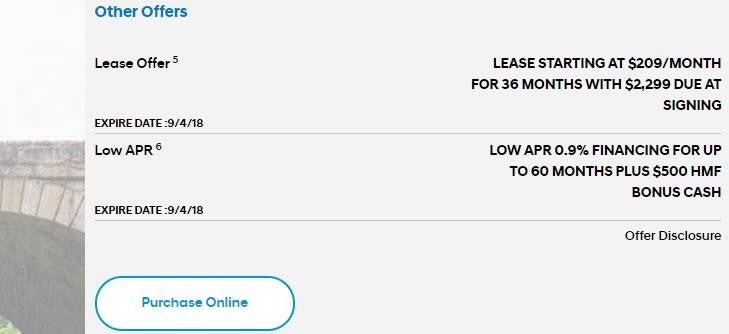
Step 1: Choose a vehicle, and then click on "Purchase Online" button which is located below the calculations information on the right hand side. Wait a moment, and a darker box with the vehicle will show on a new page on the left. Scroll down and start inputting information.
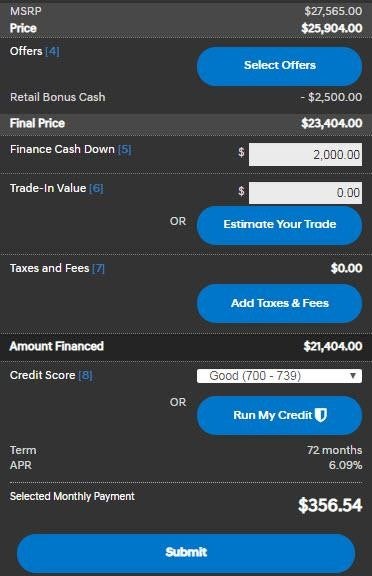
Step 2: Input an amount for the "Finance Cash Down" field, and an amount that your current vehicle is worth under "Trade-in Value".
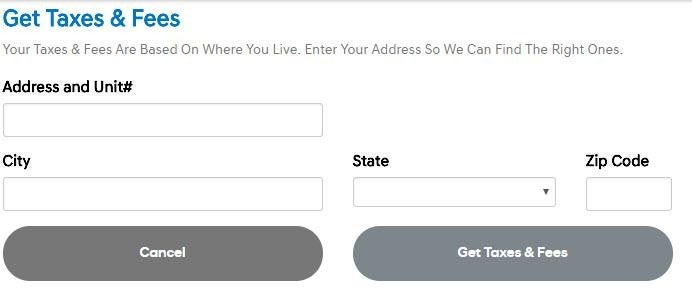
Step 3: Next, click on "Taxes and Fees" and to the right will pop up "Get Taxes & Fees". When you put in your address, the system will calculate for you what your taxes are, and you will now see them on the left in the darker box.
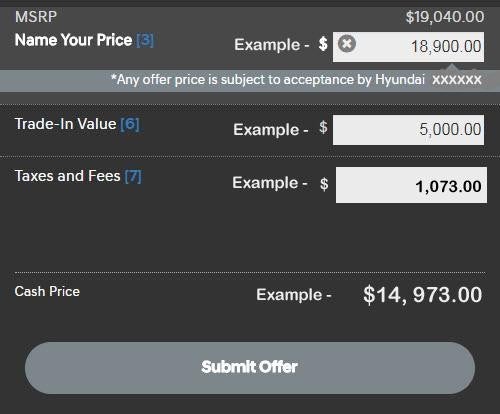
Step 4: After the other steps are completed, you will see a "Cash Price" at the bottom. Hit the "Submit Offer" and you will see a form where you would give us your information for contact so that we can get back to you.

Step 5: Come into the dealership and we'll give you a test drive, and when you are ready after our discussion, you can complete your purchase. You don't have to give us any information you already provided — we already have it.
We look forward to making this experience easy, quick, and hassle-free!
Homestead Hyundai
Address
111 South Homestead Blvd
Homestead, FL 33030
Phone
- Sales 786-255-7398
- Service 786-255-7397
- Parts 786-255-7396
| Monday | 9:00AM - 9:00PM |
| Tuesday | 9:00AM - 9:00PM |
| Wednesday | 9:00AM - 9:00PM |
| Thursday | 9:00AM - 9:00PM |
| Friday | 9:00AM - 9:00PM |
| Saturday | 9:00AM - 9:00PM |
| Sunday | 11:00AM - 7:00PM |
| Monday | 7:30AM - 6:00PM |
| Tuesday | 7:30AM - 6:00PM |
| Wednesday | 7:30AM - 6:00PM |
| Thursday | 7:30AM - 6:00PM |
| Friday | 7:30AM - 6:00PM |
| Saturday | Closed |
| Sunday | Closed |
| Monday | 7:30AM - 6:00PM |
| Tuesday | 7:30AM - 6:00PM |
| Wednesday | 7:30AM - 6:00PM |
| Thursday | 7:30AM - 6:00PM |
| Friday | 7:30AM - 6:00PM |
| Saturday | Closed |
| Sunday | Closed |